

So, as a marketer working for an e-commerce venture, you have logged in for the day and pulled up your WordPress dashboard.
The to-do list staring back at you looks endless; write three blog posts, optimize product descriptions, crop and compress images, schedule updates, send an abandoned cart email, maybe tweak SEO while you’re at it.
By the time you’ve crossed off half, you’re exhausted, and the real work (strategy, growth, creativity) still hasn’t even started.
Sound familiar?
Here’s the thing: running a WordPress site shouldn’t feel like you’re stuck on a hamster wheel. But for many of us, developers, marketers, and business owners, that’s exactly what it is.
And that’s why AI automation is such a game-changer.
Not because it’s a shiny buzzword. Not because it’ll “replace humans” (spoiler: it won’t). However, it frees us from boring, repetitive tasks, allowing us to focus on what actually drives results: creating better content, delivering better experiences, and scaling our businesses.
So if you’ve ever asked yourself questions like:
- “How do I keep up with consistent blog publishing without burning out?”
- “How do I personalize my WooCommerce store like Amazon without Amazon’s budget?”
- “Can I automate repetitive workflows without sacrificing quality?”
You’re in the right place.
Let’s take a coffee-fueled deep dive into how AI-powered workflows are transforming WordPress into a self-running growth engine for both content and e-commerce.
Why automating WordPress matters (and what’s changed)
WordPress has always been powerful, but also labor-intensive. Every site owner is familiar with the drill:
- Publishing posts manually
- Tagging and categorizing content
- Updating plugins and resizing images
- Writing product copy
- Tracking customer behavior
Individually, these tasks don’t look scary. But stack them up and suddenly you’re spending more time maintaining than creating.
This is where AI workflows flip the game.
Unlike traditional automation (which is mostly about timers and if-this-then-that triggers), AI workflows are intelligent. They learn, adapt, and make decisions based on real-time data. Instead of you chasing after every little task, your site becomes smart enough to handle them for you.
Think of it less like hiring an army of Virtual Assistants (VAs) and more like getting a super-powered copilot that runs in the background 24/7.

Automating content workflows without losing your voice
Content is still the lifeblood of WordPress, blogs, landing pages, resource hubs, and newsletters. However, anyone who has tried to maintain consistency knows how draining it can be.
Here’s how AI smooths the rough edges;
1. Research & ideation
AI-driven workflows can track industry keywords, competitor blogs, and social media trends, then auto-suggest blog topics, headlines, and publishing schedules.
This means no more blank-screen dread, and you can safely bid adieu to the curse of the blinking cursor!
2. Multi-format content creation
Why settle for one post when a workflow can repurpose it into a long-form blog article, social media snippets, newsletter copy, and even podcast talking points? All automatically formatted for WordPress, email, or social platforms.
3. Smart optimization
AI can analyze your best-performing content and apply its “winning formula” to new posts, optimizing structure, readability, and keyword usage while preserving your brand voice.
HubSpot reports that companies publishing 16+ blog posts per month get 3.5x more traffic than those publishing fewer than four.
Unraveling the midday madness ~ Carrying out the store juggling act!
Ah, the noon chaos. Orders are rolling in, carts are getting abandoned, and customers are asking, “Does this come in blue?” Meanwhile, you are drowning in spreadsheets.
Here’s where AI workflows feel like a silent business partner.
Dynamic product management
Inventory hits a low? AI auto-triggers urgency campaigns (“Only 3 left in stock!”).
Product goes out of stock? It disappears gracefully from search, no cranky shoppers clicking dead ends.
Seasonal item? AI schedules promos by learning from last year’s data (no more Christmas mugs popping up in March).
Personalized customer journeys
So, picture this: a visitor lingers over sneakers but leaves them behind. The next day, they received an email showing those exact sneakers, along with matching socks. On the site, the homepage layout reshuffles to spotlight the sneaker collection.
That’s not magic; that’s AI-powered journey mapping. According to a McKinsey study, companies that use advanced personalization report a 10–15% revenue increase and stronger customer loyalty.
Smart pricing & competitive analysis
Once upon a time, we manually stalked competitor sites for price wars. Now? AI monitors them daily, weighs inventory levels, checks for demand spikes, and nudges prices into the optimal range. It’s like surge pricing, but for WooCommerce.
Smarter customer support
Customers love instant answers. And you love not having to type “Please reset your password” 17 times a day.
AI chatbots (like Tidio’s GPT-powered bot) handle FAQs, check order statuses, and flag you only when things get hairy. Quick for them, sanity-saving for you. How cool is that?!
Getting down to building your AI workflows in WordPress
So, how do you get started without getting overwhelmed by complexity? There are three main routes you may take:
1. API integrations
Connect WordPress with external AI services via APIs. For example, OpenAI GPT for content, Google Vision for images, and NLP services for customer service.
This is a powerful route, but it needs dev chops.
2. Plugins
No-code? No problem. Plugins now make AI automation accessible:
- AI Workflow Automation Lite
- Uncanny Automator
- WPAI Workflow Automation
- n8n.io WordPress integrations
3. Custom development
For businesses with specific needs, developers can build custom hooks and filters. This is where you get maximum flexibility but also higher effort.
Measuring ROI ~ Let the numbers do the talking!
So, if you are wondering, does this all actually pay off? Well, here’s what most businesses see:
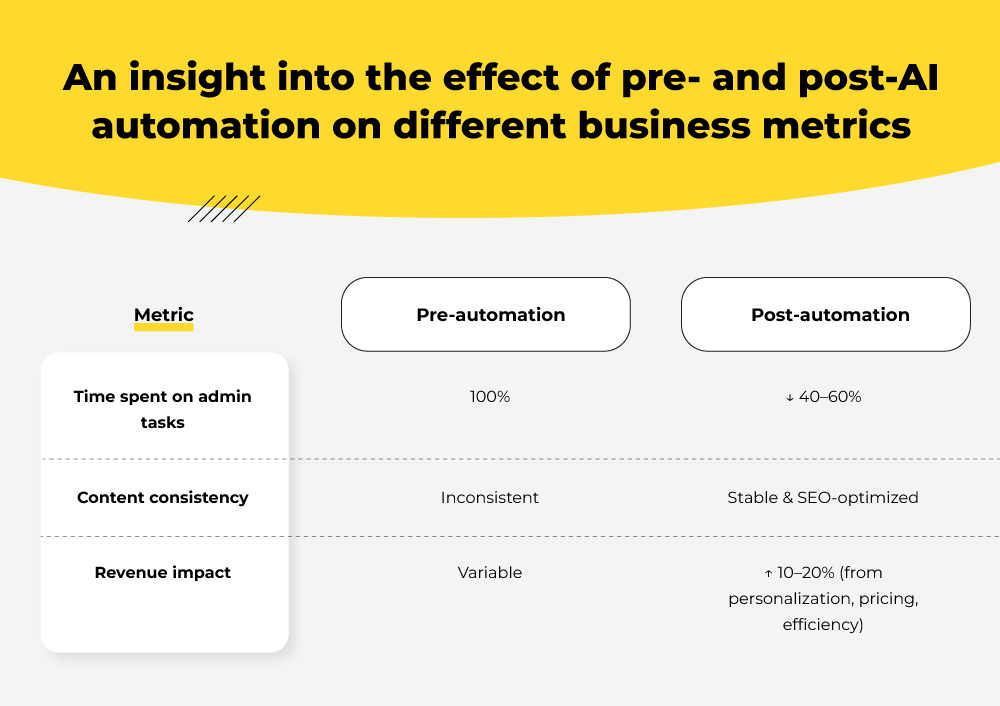
Interestingly, according to PwC, 49% of companies accelerated their AI adoption in 2024, with automation cited as the top driver of ROI.
Watch out for these pitfalls
AI is powerful, but not foolproof. Here’s what to avoid:
- Over-automation syndrome – Don’t strip away every human touchpoint. Keep humans amping up and sprinkling creativity and empathy.
- Skipping quality checks – Always review AI-generated content before publishing.
- Complexity creep – Start small (one workflow) before scaling.
Gazing into the future of WordPress AI workflows
AI in WordPress is still warming up. What’s coming next feels less like automation and more like having a co-pilot who knows your site better than you do.
- Smarter content before it even goes live
Instead of waiting weeks to see if a post sinks or swims, AI will give you a preview of how it’s likely to perform and suggest tweaks to headlines, layouts, or calls-to-action that could make it land better.
- Websites that quietly fix themselves
Navigation clunky? Buttons ignored? Text too small on mobile? Future workflows will notice these pain points and adjust automatically. No alerts, no late-night debugging, just a site that keeps tuning itself for visitors.
- One brain across all your platforms
Your site, shop, email, and social media won’t feel like separate pieces anymore. AI will connect the dots, making sure a visitor who browses your blog also sees related products in your store, gets a follow-up email, and spots a reminder in their feed.
In summary, tomorrow’s workflows won’t just save you time. They’ll actively make your site better, while you get on with running the business.
The road ahead
Still on the fence, wondering why AI in WordPress matters? Then, our detailed guide on “AI in WordPress: The Ultimate Guide to Building Smarter Websites” may help you make the right decision.
Harshal Mehuriya - Subject Matter Expert (SME)
Harshal is a visionary leader with 7+ years of experience in managing dynamic developer teams at Mavlers. As a Technical Lead, he focuses on aligning project objectives with business goals, ensuring that every WordPress site not only meets but exceeds expectations. His strategic foresight has been instrumental in Mavlers's growth, driving the adoption of agile practices and a culture of continuous improvement. Harshal mentors aspiring developers, promoting a collaborative and inclusive work environment.
Naina Sandhir - Content Writer
A content writer at Mavlers, Naina pens quirky, inimitable, and damn relatable content after an in-depth and critical dissection of the topic in question. When not hiking across the Himalayas, she can be found buried in a book with spectacles dangling off her nose!
Salesforce to HubSpot migration guide: A proven manual for smooth transitions
History of Email Marketing: Then vs Now